
Did you know you can:
- Feature your last blog post in CommentLuv enabled blogs even before you register your blog with CommentLuv?
- Register Your Blog with CommentLuv before or even without ever installing the CommentLuv plugin?
- Feature a specific page or post instead of one of your last ten posts?
While we still hope you will register and install our plugin in your blog – because both have additional benefits – neither is required to start benefiting from using CommentLuv when commenting in blogs.
In this post I will share screen captures of what you will see when leaving comments in CommentLuv enabled blogs so you will know what to expect. Note that blogs can vary in appearance and in what they call these fields but they should be similar enough for you to figure it out.
CommentLuv uses the URL you enter when commenting to pull your latest posts:
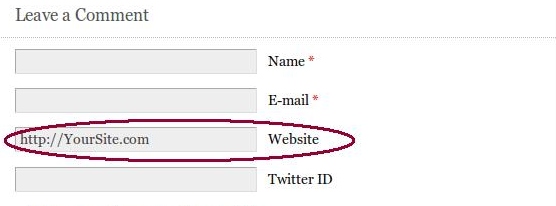
Originally, you had to ensure you always typed your URL in exactly the same; however, Andy has already improved CommentLuv to recognize your Web site URL regardless of whether the letters are in upper or lower case, with or without the trailing forward slash (/) and with or without the www.
You DO have to use the URL you registered and NOT a different specific page or post on that site.
(Read on for how you can change that AFTER you select the post you want CommentLuv to feature.)
If you enter the wrong URL, instead of your last ten posts you will see only the last published post found in the CommentLuv system.
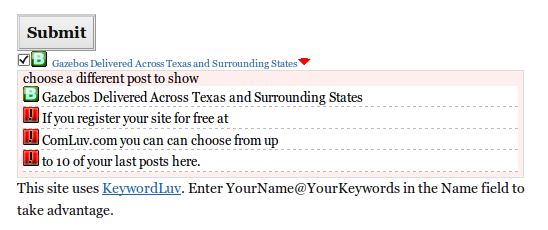
If you click the red drop-down button you will see the message pictured below: “If you register your site for free at ComLuv.com you can choose from up to 10 of your last posts here.”
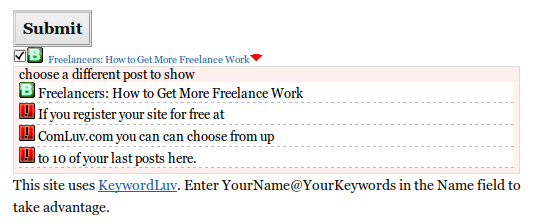
That message is exactly the same as what unregistered blogs see. If your blog is NOT registered click the Register/Edit Your Blog URL link you should see at the top of every page of the official ComLuv.com site.
[IMPORTANT: The official CommentLuv site is now ComLuv.com not CommentLuv.com.]
If you see this message and your blog IS registered, correct what you entered in the Website URL field and click into the body of the comment field so that CommentLuv will again try to pull your last ten posts.
CommentLuv looks for your posts when you click into the main comment box (where you type your actual comment).
You CAN change the Website URL linked from the regular Website URL field AFTER you have selected the post you want to feature in CommentLuv. You DO have to remember not to click into the body of the comment again.
If you forget, put your registered URL back in the Website URL field and try again. For information about why you would want to do that and more details on how that works, read my comprehensive post The Benefits of Using KeywordLuv.
If the URL you entered is invalid or not a blog instead of just not the exact URL the CommentLuv system expects you will see the message: “nothing No last blog posts to return” as shown in the image below. If your site has a blog make sure you entered the URL correctly.

If you click the red drop-down arrow when you see that message you will see: “Comluv had an error trying to fetch your feed” and some additional information on what may have caused the problem.
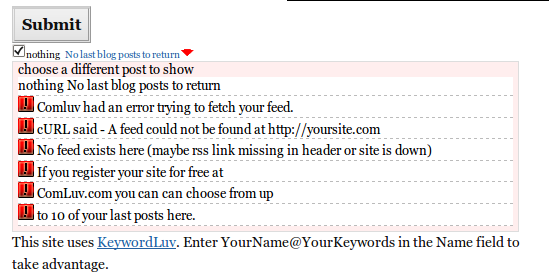
If you can’t figure it out on your own, open a Support Ticket by using the Support Tab and reading how on that page. A future post will explain step-by-step how to best get support for any CommentLuv issues you may encounter.
In the meantime anyone who needs assistance opening a support ticket can ask me at Twitter, here or in my GrowMap blog.
CommentLuv Works with non-blogs and Social Networking Sites too!
If you register the Website URL to a static site with CommentLuv, your default links can be anything on that domain.
If someone doesn’t have a site, they can register their Twitter url or other social profile page and set the feed url to that social site’s feed for their account so they aren’t left out when they comment on commentluv blogs.
Alternatively, static sites based on WordPress CAN benefit from using CommentLuv even if they are not registered. Here is an example of what you see if your site is on WordPress but you have not published any posts:
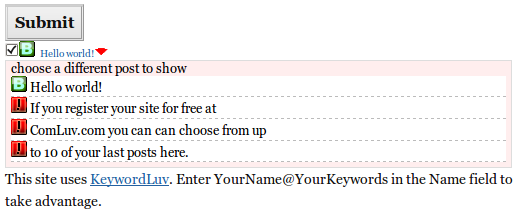
Hello World! is the title of the default post in a new WordPress install. If you don’t intend to blog you can log into your site and edit that post. I recommend you use the title that describes your site best and create a post specifically for visitors coming to you from comments you leave in CommentLuv blogs.
Be sure to edit the Permalink so that it contains your new post title and not Hello World! [Note: if you have an existing post using that URL that you do not want to change or that has incoming links changing the permalink WILL affect this.]
After you publish or update your new post there can be a delay before CommentLuv will pick it up. During that time you will see a message similar to the one shown below that says “Response cached until”…”(Refreshes in xx.xx Hours)”:
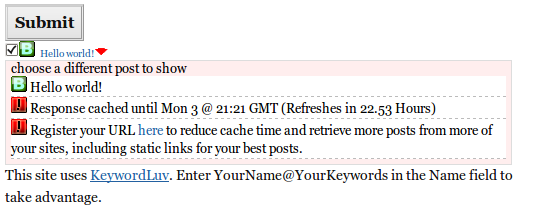
Simply wait until CommentLuv picks up your new post and from then on you can feature that post in all your CommentLuv comments. Once your new post has been picked up by the CommentLuv system it will appear in the dropdown as you can see in this image:
You don’t have to be limited to just that one post or page though. If you don’t want to wait you could go ahead and Register Your Blog with CommentLuv and always select that post from the drop-down choices.
CommentLuv bloggers and CommentLuv users can now select any post or page on their registered URL they wish to feature in place of their last or one of their last ten posts!
Andy has added a way that you can feature specific pages on any site that he calls Default Links. I will write about those in depth in a future post, but why wait? Here is the information on how to add CommentLuv default links.



Twitter: GrowMap
says:
Test
GrowMap´s last blog ..Affiliate Tips Tuesday: How to Deep Link ShareASale
Twitter: kikolani
says:
CommentLuv, ironically, can also serve as a first notifier if your website has been hacked, as I learned a few weeks ago. I was trying to post a comment and got the Comluv had an error while fetching your feed message. It detected that my feed, amongst everything else, had the malicious code in it and didn’t allow it in the system. Just a little added bonus.

Kristi´s last blog ..On Writing for the Web
Twitter: commentluv
says:
I know a few bloggers have discovered their blog had been hacked by the same method. It also helps spot bad commenters because of the last blog post not showing on static site commenters. I’m glad you were able to fix your blog before it became a zombie bot!
Twitter: virtuosoblogger
says:
Same Happened to me when i got a feed error, just not bcoz of hacking but my mistake, but it helped me find the root cause of the problem
Gautam Hans @ Blog Godown´s last blog ..Bloggers: Are You Making This BIG Mistake?
commentluv is a great thing, it helps both parties. the blogger and the commenter
wannabe´s last blog ..The Music Box
Twitter: commentluv
says:
yup, that was the point of it. Glad you agree.
Thanks for an awesome plugin and for all your testing today

Kim Woodbridge´s last blog ..Mother’s Day: How Would You Like to Be Remembered?
Thanks Gail for putting this down as a blog post, it’s something I should have done a looong time ago! (I do prefer to speak php though)

Andy Bailey´s last blog ..Godaddy coupons offer extended
Twitter: commentluv
says:
test reply for subscribe to comments
Twitter: GrowMap
says:
Hi Andy,
None of us can make time to do everything. That is why I am such a strong believer in collaborations that allow each of us time to do what we do best.
There will be many more enlightening posts like this that come out of our Working together.
Gail @ GrowMap´s last blog ..Follow Friday: XLNT New Social Networking Blog
Twitter: lovelyleiah
says:
None of my comments on any CommentLuv sites EVER show my last post. Ever. I hope this fixes it.
Twitter: commentluv
says:
make sure your site url is registered with this site (http://comluv.com/member/) and be sure to specify your exact url on the same page.
once that is done, use the EXACT same url as the one you registered when you comment. (that means if you register without www, don’t put www in when you comment)
oh, and always prefix your url with http://
Twitter: jmc1871jc
says:
It is great that comluv is dofollow for registered members of the site.
This weeds out the spammers doesn’t it?
Joanne´s last blog ..Media Savvy – How To Lead,Persuade And Influence – Thomas Murrell
Twitter: commentluv
says:
It should do, yes. and if someone who is a registered member decides to be evil and start spamming dofollow blogs, they get axed at source so they wont be able to do it any more. Nice.
Twitter: kujie
says:
i’m a register member, buat doesn’t word at my blog, why ya?

kujie´s last blog ..Badminton Piala Thomas 2010 Online ( Live )
kujie recently posted..
Twitter: kujie
says:
work*
one more – i want to know how to make my comment like this
kujie from hidup biar sedap say , how to fix commentators link.
Thanks ya!

kujie´s last blog ..Badminton Piala Thomas 2010 Online ( Live )
kujie recently posted..
I love comment luv! Thanks

chinafashionblog´s last blog ..Golden Bag
chinafashionblog recently posted..
Twitter: commentluv
says:
you’re welcome
I’m excited about this feature. I’ve been researching SEO recently – in addition to the lessons I’ve learned the past few years as a writer for the web – and I’m looking forward to the possibilities of CommentLuv.

erinmarie´s last blog ..Love is a Verb: Love and Marriage
erinmarie recently posted..
Twitter: elizobihfrank
says:
I love Comluv even though I still haven’t figured out how to activate it on my free WordPress blog. What I am a tad concerned about is that from time to time I get that error message about no posts at this time… I got that message today and I hope my re-registering my blog here clears the air.
The great thing about coming here to solve the “no posts” mystery was that I learned a new option to my dilemma. I still want to make sure my actual site is not being blocked or something more sinister. Danke!
Andy, any chance of a print out for that vimeo on moving a Blogspot blog to Comluv? I would love to do that.
Thanks for the superb job to date!
Cheers,
Eliz
PS. When I typed/pasted in my website address, it didn’t respond. I had to copy and paste my recent post into the website box. Any suggestions? Thank you!
ElizOF´s last blog ..Money & Emotions: How Can I Make a Difference Today?
Twitter: GrowMap
says:
Hi Eliz,
Whenever you run into not seeing your posts first try pointing at Member (top right) and clicking unban URL. Type in your URL and that will reset it or tell you if there is a problem with it or not.
GrowMap recently posted..How CommentLuv Grows Businesses and Blogs
Twitter: wpexplorer
says:
I was wondering about the blocked thing also, seems like one of my sites was blocked, probably cause my blog was in a subfolder…I never noteced the Unban URL thing before. thanks for pointing that out..
I guess I just need to remember to type the full url path to my blog.
AJ Clarke recently posted..WordPress 31 Post Formats
So I’ve been to multiple blogs recently that claimed they supported CommentLuv – they even had the checkbox. For some reason though, quite a few of the sites don’t even try to pull my last comment. Is this just an old version of the plugin? Are they trying to get additional comments without actually having the plugin installed?
TJ McDowell recently posted..Photography Startup – How To Price Sessions
Twitter: commentluv
says:
make sure that you’re using http:// in front of your url when you try to comment.
sometimes, the website you’re on automatically fills in the url field when you return to comment again and it does it wrongly or you made a typo. Delete the text that gets entered automatically and manually type in your url with http:// again and see if that does it.
Thanks for taking the time to reply. It looks like some sites may just be using a commentluv icon and checkbox to try to get more traffic without actually displaying the last blog comment.
Also, I’ve noticed that some of the sites that have commentluv installed are making the last blog post link a no-follow. Isn’t the entire reason to display the last comment so that you will get a do-follow link?
Btw – thanks for coming up with such a brilliant idea – I’m definitely loving the commentluv plugin!!
TJ McDowell recently posted..Increase Website Traffic By Posting Wedding Pictures Online
Twitter: financialsamura
says:
Andy, really appreciate you responding and helping out with our technical issues on Yakezie.com.
I would love to interview you on Financial Samurai and send you several questions and so forth for you to answer and share with the readers on my site. If not, that’s quite alright too.
If there’s anyway I can help spread the word about what a great plugin Commentluv is, pls don’t hesitate to ask.
Cheers,
Sam
Financial Samurai recently posted..The 300 Million Dollar “A” Yacht Owned By A Russian Billionaire
Thanks for sharing this information. I knew about keyword luv but i didn’t know about comment luv….thanks for it.
Twitter: david_dunford
says:
Exactly the same issue I was facing but mine was a user error

Nice to see the admin support team are on the ball. Cheers guys and gals.
David Dunford recently posted..Top 10 Essential Internet Marketing Tools Found In Every Internet Marketers Toolbox
I had a heck of a time registering. I have comment luv enabled at my blog, I am not a spammer. But I couldn’t sign up here for awhile because I was rejected as a spammer. Glad to have finally been able to register. I look forward to getting the benefits of the anchor text.
boardwalk recently posted..The Truth
Is keyword luv a part of / sister of comment luv, or are the totally separate things? Not looked at keywordluv. Hmmm, thinking, cannot see the point in kw luv if you have comment luv though, as the comment link will have keywords in it (if the blogger writes sensible titles).
jonbey recently posted..How to Lose Belly Fat in 1 Week
Twitter: commentluv
says:
keywordluv is nothing to do with commentluv. You’re right, if the blogger uses proper titles then they wont need it!
Twitter: GrowMap
says:
Hi Jonbey,
As Andy already answered, KeywordLuv is another plugin not related to CommentLuv in any way. The point of KeywordLuv is that by offering both a blogger can use a more compelling title to attract readers from other blogs in CommentLuv and their best anchor text keyword phrases in the name field.
Just using your target keywords as your title does not make a very compelling title and having more words in your link is weaker for getting better search engine positions.
That said, I do recommend setting up CommentLuv default links for your best anchor text phrases so you have a choice when you are commenting in other blogs that do not use KeywordLuv.
The post I’ll feature in CommentLuv in this reply has more details on using CommentLuv along with KeywordLuv.
GrowMap recently posted..DoFollow CommentLuv KeywordLuv Community
Twitter: CoachNotesBlog
says:
I never realized you could “Feature your last blog post in CommentLuv enabled blogs” even if you weren’t using the plugin on your own site.
I think it never ocurred to me because when I see that a commenter didn’t use the plugin’s last post feature, I figured they didn’t have CL installed on their blog or they were using a website platform that didn’t work with CommentLuv.
Sheesh, and I’ve been using CommentLuv for a year . . . Amazing!
CoachNotes recently posted..When Does An Online Customer Referral System Make Good Business Sense
Twitter: GrowMap
says:
Don’t feel bad…almost no one else knows that either. That is why I wrote this post. The other best kept secret is that you are not limited to your last ten posts either. You can feature your favorite posts/pages and use either a compelling call to action or your best anchor text links by using CommentLuv Anchor Text Links,
GrowMap recently posted..Join Bloggers Supporting Bloggers NOW
Been using it a while now when posting. Have yet to see seo improvements yet. We’ll see.
relaxing recently posted..Lita Gives Soapy Foot Massage
I love this concept of “pay it forward” because I loved that movie and it is perfectly applicable to sharing the love on comment enabled sites. Thanks for pointing out not only comment luv but the keyword luv plugin too. Both are great!
Sarah recently posted..Watch Patriots vs Lions Online Streaming on Thursday- November 25th at 12-30pm
Twitter: coreyaustin
says:
I love commentluv! I wrote a short article about the plug-in last year and it continue to be one of my most visited pages from Google.
Corey recently posted..The Golden Hour
Twitter: tonyclingan
says:
I had not realized how powerful this plugin was until a week or so ago, needless to say I am now going to install it on my blog as well to share the benefit further
Thanks for providing such a great tool for us Tony
Tony Clingan recently posted..“Micro Outsourcing Arbitrage Opportunity Or Step To Far”
Twitter: hecktictravels
says:
Great article, thanks for sharing this!
hecktictravels recently posted..What Were We Thinking
commentluv is a great .. love to us this application on my blog =)
anastasyea recently posted..Pesta Kutip Duit Syiling Bertaburan Bernilai RM75-000 di Lebuh Raya PLUS Selepas kemalangan
Twitter: Paintballblogin
says:
That’s interesting, thanks for the new piece of mind that commentluv can sometimes pick up on some malicious things interacting with my blog. If i found out my blog was hacked because of my feed, I would feel completely taken advantage of.
dyepaintballfanatic recently posted..Help me grow my blog into something great
I have no idea about how to use comment luv more effectively. Can some1 give me a piece of advice?
Nick recently posted..5 Awesome Gifts for Geeks
Nick, you should use comment luv on your blog, because people will be motivated to post meaningful comments on your blog, that will benefit the overal discussion.
Adam W. Prillis recently posted..Top 10 Kindle Accessories- The Most Popular Accessories for Kindle List
Twitter: PatriciaJVanderburgyahoo.com
says:
Thanks for the excellent article. I’m still relatively new to blogging.When I comment on other CommentLuv blogs, I get to choose from articles from my blog. Would linking a account to my CommentLuv account and posting articles there have more value than linking to articles on my blog?
PatriciaJVanderburg – sewing machine tables recently posted..How to Shop for Sewing Machines – Janome Sewing Machine Tables
I havnt yet tried with the different version of my domain. However, if it still recognises the domain then it is a great feature indeed.. kudos..
Suhaib recently posted..How to Start a Restaurant
Twitter: polanskimax
says:
Testing out CommentLuv. So far looks like it’s working. I get to actually choose what post I want to feature. It sucked, before I could only post one blog post… Good stuff.
maxpolanski recently posted..Black Magnetic Dry Erase Board