

Use this code in the address bar to view the user_id of each user in your wpmu user list
javascript:var user_id = jQuery('span.edit a').each(function(){ var sHref = jQuery(this).attr('href'); var sStart = sHref.indexOf('='); var sEnd = sHref.indexOf('&'); jQuery(this).parents('div.row-actions').before(sHref.slice(sStart +1,sEnd));});
It’ll look like this
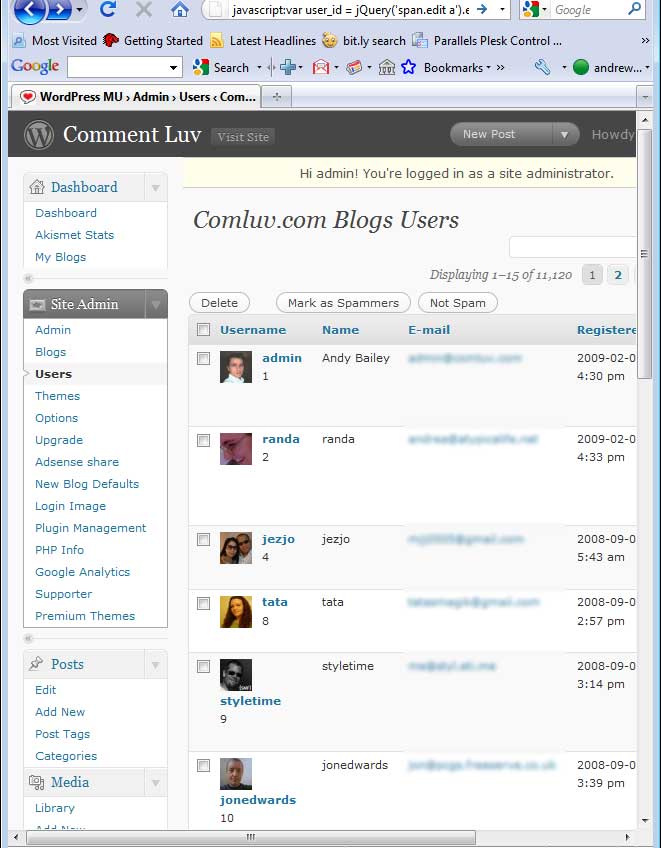




Nice work, you can make it into a bookmarklet too, which you can drag to your bookmark bar for ease of access:
Show Ids Bookmarklet
Barry´s last blog ..Playing with themes again – sorry
Twitter: elJqVXgQLkZZmwBN
says:
I edited your link to point to the bookmarklet maker page you sent via twitter because WP stripped out the javascript bit of the link in your coment.
Andy Bailey´s last blog ..JSKIT goes to Echo and so does CommentLuv