


Info panel not showing your information
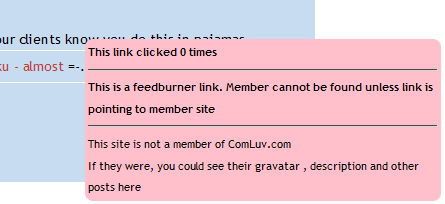
If you see the above picture on your heart info link then it will be because you are using Feedburner to display your feed and you have item click tracking enabled. What this does is replace the links that point to your posts within your feed and instead, point them to Feedburners own site so they can track how many clicks you get on your feeds post titles.
The problem with this is, even though they say it doesn’t affect your Google juice, it will not associate your title keywords with the URL that the link forwards to unless the link is followed. It also has the disadvantage of making your luvlinks look just like most other feedburner links. If the ComLuv API can’t recognize your link then it can’t send back all the lovely info you typed into your profile.
Solution
Switch off item click tracking…
1. Visit Feedburner.com and login to your account.
2. Choose the feed you want to change the settings on.
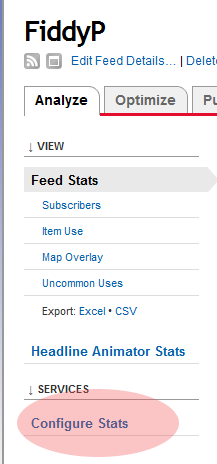
3. Click “configure stats”
4. Deselect the checkbox marked “Item link clicks”
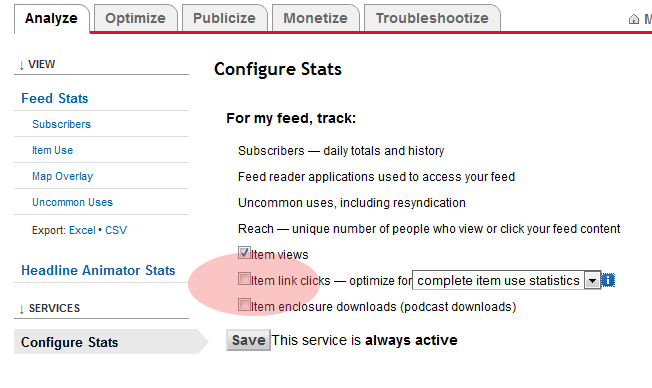
5. Click “Save”
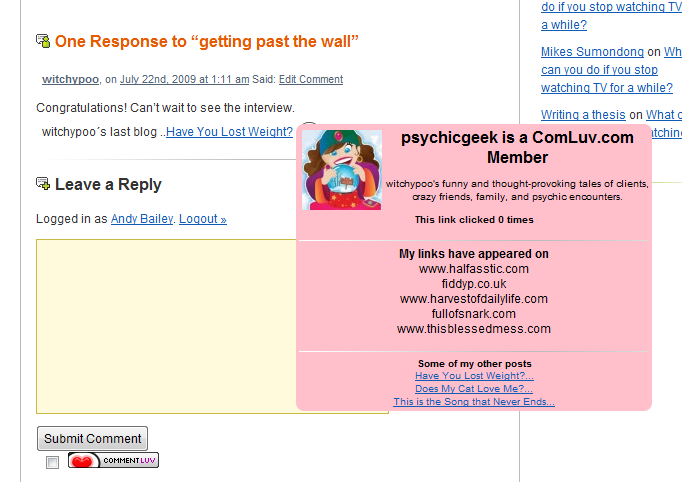
That’s it, you’ve configured your Feedburner feed to not forward your feed links and instead, point them direct to your site so you can have an awesome info panel like this one.



Twitter: barbaraling
says:
Not only that – Feedburner also steals away link love too. I wrote about that at Danger Will Robinson! ttp://tinyurl.com/5e3blq
Barbara Ling, Virtual Coach´s last blog ..YOU tell ME – what do YOU want to learn about making money online?
Twitter: commentluv
says:
I think the only reason many people use feedburner is so they can see how many readers they have! I find the wordpress built in feeds so much more powerful. Guess I’ll have to find a way to add stats to the feeds so people can get a good idea of how they’re being served.. one more for the todoodlist!
Andy Bailey´s last blog ..Changed the support ticket system and time for content!
Twitter: oims
says:
I think if it’s possible that’s a great idea. I’m using Feedburner (because of the Google connection), but hate the idea that the domain name gets lost in the process. So I’ll be watching to see if your wizard-like talents figure out a way around Feedburner

oimdiane´s recent blog post ..Evie iPhone App Gives Peace of Mind By Creating Voice Activated Connections
Andy, I use Feedburner because when I first started my blog it was on Blogspot, then WordPress.com, and now it is self-hosted. I simply want an easy way for people to subscribe; I’m not too interested in SEO.
So what makes WordPress’ built-in feeds more powerful than FeedBurner’s?
(Thanks for the tutorial, btw…while I’m not *too* interested in SEO, I still want more luv coming my way than Google/Feedburner’s!)
Twitter: commentluv
says:
I prefer wordpress own feed handling because you can have separate feeds for any category so if you write about a particular niche subject on your site, you can specify a feed link that allows users to subscribe only to that subject. Feedburner will redirect any feed request just to your main feed.
Andy Bailey´s last blog ..CommentLuv URL registration updated
Is there a comluv member list? How can you go about finding other blogs that use comluv to better support the network?
Jesse Jameson´s last blog ..‘Cove’ Director Surfaces Deep (And Dark) Secrets : NPR
Twitter: commentluv
says:
I have been working hard behind the scenes writing the classes and functions for putting in a top list and active sites list in the near future. I should have it on the site sometime soon!
Twitter: lavenderuses
says:
Yippee that will be soooooo good when that comes out Andy. I trawl through Twitter each day looking for good posts to read and comment on. Also visit here couple of times a day to see who is commenting, who are top commenters etc. There is already heaps of really good information here but that will be mega
Appreciate all that you do to make this community such an amazing one to be part of. Thanks Andy. You really are appreciated.
Patricia Perth Australia
Patricia´s recent blog post ..Are You a Tweetheart-Commenter…or both!
I like Feedburnder for all the info it provides, but I may have to revert back to the WordPress blog after learning about the link redirect.
JournalStone´s last blog ..Lutherans and the Gay Community
Twitter: commentluv
says:
you can switch the link redirects off if you want but it still leaves you having to manually burn a feed for each category if you want separate feeds for each one. WordPress does it automatically
Twitter: wwginger
says:
I’ve followed your instructions here, and turned off all feedburner plugins… but I just registered my domain with your site today. Is there a lag between registering and our links showing up correctly?
gingerwench´s last blog ..Updating WordPress Tips and Tricks
Twitter: coreyaustin
says:
Genius, I love feedburner and the functionality it gives me, but I love commentluv more. Thanks for the help!
Corey´s last blog ..More GPS enabled photography
Twitter: SoftwareCritics
says:
You’re awesome Andy! I’ve never thought of that until I’ve read your post.
Thank you for this tip.
Mathdelane´s last blog ..Keywordluv Abuse and No Follow Free on Do Follow Blogs
Twitter: commentluv
says:
glad to help!
Is there a way to make the heart icon and link show up retroactively? I posted a comment on a commentluv site before I knew what commentluv was all about…
Or specifically for this topic, will the links that already exist on other people’s blogs change once I follow this advice?
goodfeel´s last blog ..How to Overcome a Mental Block
Twitter: commentluv
says:
only comments made after commentluv has been installed will have the link. There’s no way to retroactively add them.
Twitter: DaneBlogger
says:
Thanks, I think it works. I just changed it, but doesn’t work, so I let the site point to /feed/
Mikkel´s last blog ..6 Easy Steps to Get Started With Podcasting
Twitter: commentluv
says:
looks like its working fine for you now. Sometimes all it takes is a trailing slash
Twitter: ejendomsservice
says:
This works. Thank you. I was looking for that tip

ejendomsservicesnerydningtrappevask´s last blog ..Snerydning
Twitter: ejendomsservice
says:
Wrong username. Its fixed now.
Im now a part of your community. Looking good..
ejendomsservice´s last blog ..Snerydning
Twitter: mmangen
says:
I do have my stats configured as indicated above in Feedburner but I am still getting an error message when I post on blogs (such as this one) that has CommentLuv enabled.
Any other suggestions on how to get my feed to work?
Twitter: commentluv
says:
it will show you as a member on links made after you registered and have switched off redirects. Old links will still point to feedburner.
Cool, didn’t know this.
rskrodzki2´s last blog ..Remember this ? ~ Personal
Great heads up Andy. Also thanks to my friend Lean Life Coach for highlighting this post!
Best,
Sam
Financial Samurai´s last blog ..Everything Is Rational – The Answer To All Things Irrational
Twitter: commentluv
says:
I think feedburner are able to use your own blog url in the feed items now. I will have to check, I stopped using them to do my feeds a long time ago.
Twitter: mcdpoker
says:
very cool indeed, ive been a member of comluv for less than a few hrs and I have learnt a lot already. Thanks, hope it works, will soon see when i click on submit.
mcdpoker´s last blog ..Poker Tour News: Dec. 21-27, 2009
Twitter: commentluv
says:
yup, it worked for you fine!
Twitter: ZenMoments
says:
Ahhh, someone above has just answered my question regarding if there was a lag time between links showing after registering the URL.
I thought though that if the URL was registered, that I would get a drop-down list on a commentLuv enabled site to select from a list of articles instead of just having the latest one show. Perhaps I misunderstood something?
John
zenmoments´s last blog ..Satisfaction For Sale
Twitter: commentluv
says:
once you have registered your main url at http://comluv.com/member/ then when you comment using that exact url, it will show you the 10 last posts.
Make sure you haven’t registered your site with www and are commenting without the www in your url.
Twitter: ZenMoments
says:
Hi Andy,
In reference to my problem of not seeing the 10 posts to choose from, yes I am using the same format for the URL here and on comment forms (always with the http:// prefix and the www). I noticed just now however that when I checked my registered URL after setting it yesterday with all the details, that today the details were gone (only the address remained but without the http:// prefix as I had set it). Because the details (title, description, feed address, keywords) had disappeared though, I removed the address and began again just now so everything is there again. We’ll see if I get the 10 choices now.
Thanks for caring

John
PS: I notice I am not getting the choices here on this comment
zenmoments´s last blog ..Satisfaction For Sale
Twitter: commentluv
says:
you wont be getting 10 choices because you don’t have that many posts on your site, it will only show up to 10 from whatever is on your feed.
Twitter: ZenMoments
says:
Actually I have 40 posts on my site and they are all in the feed.
John
zenmoments´s last blog ..Satisfaction For Sale
Twitter: commentluv
says:
when I browse to your feed (http://feeds2.feedburner.com/Zen-moments) by clicking on the rss icon in the address bar it only shows only 5 items but when I click the link, it shows the full feed. how strange! there might be some forwarding error somewhere.
you can try it yourself. click the link and also copy the link and paste it into a new window and see if both pages look the same.
Twitter: ZenMoments
says:
I don’t know why would be. I get varying results myself. My site points to the updated feed address since Google took over FeedBurner (they added a “2″ after “feeds” in the address). Somewhere in feedburner I seem to recall a setting that sets the number of items to show in a feed, but I can’t find it anymore.
Regardless, shouldn’t commentluv recognize that I have more items to choose from, even if it can only access 5?
John
zenmoments´s last blog ..Satisfaction For Sale
Twitter: commentluv
says:
It can only show what it gets given. It must be seeing the one with 5 on it. have you set your feed url in the member page? try setting it to http://www.zen-moments.com/feed/ to see if the forwarding option works better than the direct access via feeds2.feedburner
Twitter: ZenMoments
says:
Thanks, but when I navigate to http://www.zen-moments.com/feed/ it redirects to the same feeds2 address and still only shows the last 5 posts. I’m surprised that I don’t get a choice in a drop box for at least those last 5 posts. I get no drop box at all with any choices.
I think I’ll let it go now. Perhaps in a week or so I’ll look at this again. It’s too much of a time sink right now. I appreciate your efforts and quick responses.
Best,
John
zenmoments´s last blog ..Satisfaction For Sale
thanks. great tips! just want to test here, whether it work or not ^_^
naz´s last blog ..Kontroversi penggunaan nama Allah : Gereja di bakar
Twitter: yullian
says:
I turned off “Item link clicks” but info panel wit my profile doesn’t appear at all. :/
yulian´s last blog ..RedLine theme has a multilingual interface
Twitter: commentluv
says:
once you turn that option off, it will only show you as a member on links that are added AFTER you switch it off
Twitter: webduck
says:
Thanks for the great tips Andy. I think I have my feeds updated now so I can have more SEO juice. :::crossing fingers::::
webduck´s last blog ..Old Bordeaux Washington – Mumby, McIver, Costigan
Twitter: commentluv
says:
yup, your feed is working fine to show the proper links.
If you use feedblitz, their system can use the item tracking and when commentluv asks, it sends back the normal link so you get maximum SEO
OK, so I edited my Feedburner account and yet when I enter the URL in the website CommentLuv still pulls the feedburner address – is there a period of time that must pass before the the settings propagate through?
Cemil´s last blog ..What Is The Google Sandbox
Twitter: commentluv
says:
your posts or settings will probably be cached by feedburner or comluv for a day. If it’s still doing it after 48 hours then let me know.
Starting to feel the Luv now – didn’t even know it wasn’t configured right. As a bonus, I found out some people had subscribed to feedburner, magical!
jeffster´s last blog ..Beating the Feeling of Disconnected and Isolated
Twitter: commentluv
says:
glad it helped!
Twitter: rtwdave
says:
Thanks for the great tip, I just made the update.
Dave´s last blog ..Holiday Extras Travel Insurance
Twitter: commentluv
says:
and it worked!
Twitter: MetacomCreative
says:
I just updated the settings in my FeedBurner account. Let’s see if this works!
Ryan´s last blog ..Mt. Baldy California – Photography
Twitter: commentluv
says:
it’s still showing as using feedproxy . might be cached, give it 24 hours and try again
Twitter: ganapathymsa
says:
Like the linkluv concept. Thanks.
Ganapathy´s last blog ..feedbackify
Why did my name suddenly start saying “no last blog posts to return?”
Twitter: commentluv
says:
please submit a support ticket.
Twitter: TechChunks
says:
Okay, I’ve changed the FeedBurner settings. NO CHANGE!
As a test I’ve changed the CommentLuv feed URL to point at my blog’s feed URL. Still no change? Please help!

techchunks´s recent blog post ..The YEE Flying Car Concept: New Paradigm for Future Transportation
Twitter: commentluv
says:
please submit a support ticket with all the relevant details so I can track down the problem for you.
Twitter: TechChunks
says:
Looks like it is working, finally.
But I guess I had changed the feed URL to my blog URL. Need to change it to Feedburner URL to be sure all are really fine now. Will keep you posted. Thanks.
techchunks´s recent blog post ..Top 10 Ultimate Technological Tattoos
Twitter: AMater
says:
Followed these steps, but the link still redirects to Feedburner, as you can see. I sent a support ticket about it, but maybe you can reply here and see if we can figure something out.
Thanks, Andy!
amater´s recent blog post ..Transcription Crash Course Review – Become a Home Transcriptionist Today
Twitter: commentluv
says:
maybe it hasn’t updated your feed yet. See if there’s an option to reburn your feed.. (or use feedblitz which is 100% compatible and wont show proxy urls if it detects it’s a commentluv link)
Twitter: AMater
says:
Something interesting I noticed is that “Original Feed” is showing this: http://feedproxy.google.com/WorkFromHomeResourcesBlog. If I’m correct, shouldn’t it be my actual blog feed URL instead? Could this be causing it?
As far as updating, I can’t imagine it would have taken a whole month to update. As I mentioned in my ticket, I did this about a month ago, but I still have this problem.
amater´s recent blog post ..What a Man- a Dog and a Leash Have to do with Internet Marketing
Twitter: commentluv
says:
make sure that the feed url you have set in feedburner is pointing to your wordpress feed and go over your settings again.
If it wont change, try feedburner support, I don’t use them and haven’t for over 2 years because of all the issues I had with them so I’m not familiar with their setup any more.
Twitter: AMater
says:
I got it working, but something definitely got messed up with Feedburner. For some reason I have two burned feeds for my blog, and the one does point to my actual blog feed. I unticked the box for that feed also, and all is working now. Must have been when everything got transferred over to Google after they took over.
Thanks for your help, Andy!
Oh sorry lol, it’s working now. I guess it needed some time to refresh or whatever . Thank you very much for this tip, i was afraid im stuck with feedproxy links. Tnx
selina213´s recent blog post ..Jean Beaded Napkin Ring
Twitter: azuanrazi
says:
I’m already adjust this setting.. now its working.. great..
Hidup Seorang Blogger´s recent blog post ..Gaya Hidup Seorang Blogger Separuh Masa
Boy am I glad I found this article! I checked a comment I had left, and sure enough, Feedburner was redirecting my link. I turned it off, made another comment, and everything looked fine. I checked another old comment and it still showed the redirect, so I guess I lost the link luv for all my comments up till now. Something about this should probably be very prominently posted on the home page and somewhere in the sign-up process.
fisherofmen1967´s recent blog post ..The Burning Question in Florida
Twitter: sonlinebiz
says:
Saw this same info @ Mavis Nong’s blog and immediately rectified the error. All that’s left is for me to start building my dofollow minks from scratch again.
Udegbunam Chukwudi´s recent blog post ..Top Three Ways Of Building A Mailing List For FREE!
Twitter: geekbabe
says:
just made the feedburner corrections, posting here hoping it works:)
shoppinqueen´s recent blog post ..Autism- All the King’s horses
Twitter: commentluv
says:
perfect!
Andy Bailey´s recent blog post ..Get PR4 – PR6 Links from as little as 1 per day
how to enabled xx last blog in my blog??
cascd´s recent blog post ..Tragedi 20102010 Yang Sukar Dilupakan
Twitter: commentluv
says:
please do not use the comments to ask for support. Use the support tickets in the dashboard.
Im having a bit of a problem .. I dont get the option to add my URL, after I click link add URL the page is just blank with a little text on it, but no form to fill out my information. Do anyone know why that is ?
jay1522´s recent blog post ..How to Spin Articles
Twitter: commentluv
says:
please could you submit a support ticket with the url you are trying and the page you are trying it on. copy and paste the text you are seeing into the ticket too so it will be easier to track down what the problem is.
I use both Comment Luv and Keyword Luv. Both are great.
However to get my feed to appear I have to enter http://www.example.com/feed/ in the website address, then when I fill in my name: Fitness 21 @ Winter Running – Keyword Luv links my keywords to my feed rather than my site. Is there away arounf this?
Thanks in advance
fitness21´s recent blog post ..26 Extreme-Winter Race Series 2010
Twitter: commentluv
says:
this site is using comluv gold so it wont allow keywordluv type names, it already adds the site name from the comluv users account.
if you visit the member page at http://comluv.com/member/ , you can specify your feed url and site name there so you wont need to use /feed/ in your url or @ Winter Running in your name.
I am talking about general sites that use both comment luv and keyword luv. Unless I specify both my feed url and site url as http://www.example.com/feed/ I only get one post to chose from but if I add /feed/ to both url’s I get the full list of ten posts to choose from.
Thanks
fitness21´s recent blog post ..Top 5 Excuses Not To Exercise
Twitter: commentluv
says:
visit the member page at http://comluv.com/member/ and make sure your site details are correct.
please use the support tickets for futher help. the comments section is not a good place to track issues.
Andy Bailey´s recent blog post ..How to Keep Dogs from Barking All Night
Andy,
You’re asking people to submit support tickets, but I click on the support link and there’s nothing there about a support ticket. And trust me, I need to submit a support ticket right now. The link about to show as mine isn’t even something I’ve written; now it’s really weird.
mitchman´s recent blog post ..3 Well Kept Secrets No Newbie Knows About Blogging And Internet Marketing
Twitter: commentluv
says:
can you tell me what you put in the url field to get it to fire off the commentluv plugin to fetch a post? it isn’t coded to fire if there is nothing in the url field
It came up with the domain name of my blog, http://www.imjustsharing.com. It was already there, so I didn’t put anything new in. And notice, this time nothing’s coming up at all.
Twitter: commentluv
says:
looks like it might have been a temporary glitch. I put your url in the unban page at http://comluv.com/member/unban-url/ and afterwards it worked for your url.
the support tickets are in the dashboard of this site at the top left if you need them
Twitter: Jajodia_Saket
says:
Thanks for the info but is there no other workaround instead of turning the feedburner tacker off???
Saket Jajodia´s recent blog post ..Wish You All Happy Republic Day
Dang! It’s still not working! What’s the problem? I’m at http://TheBusinessCoachforMom.com
Twitter: commentluv
says:
you should submit a support ticket in the dashboard if you’re having a problem with commentluv
Twitter: GizmosHub
says:
Thanks for this great tutorial. I was just looking for this, hopefully it works now.
Gustavo´s recent blog post ..Password Recovery and Reset for Windows Vista XP 7
Twitter: cruisesurfing
says:
thank you very much for the help!
Cruisesurfing Z´s recent blog post ..Fear and Loathing and Expectations